> ## Documentation Index
> Fetch the complete documentation index at: https://docs-dev-feat-docs-5521-google-one-tap.mintlify.site/llms.txt
> Use this file to discover all available pages before exploring further.

> Describes how to create custom messages and translations with Forms.

# Custom Messages and Translation

You can  customize Form messages to provide your users with a unique Form experience. In addition, you can translate form components, errors, and other custom messages into other languages for a localized experience.

## Messages

Through the Form editor, you can customize error messages and create other custom messages for your users.

### Error messages

You can create custom error messages to replace the default error messages of your forms.

To create custom error messages, follow the steps below:

1. On the Auth0 Dashboard, navigate to **Actions > Forms**.
2. Select **Messages** from the left menu of the Form editor.
3. Select the **Errors** tab\*\*.\*\*
4. Enter your custom error messages in the appropriate fields to replace the default messages.
5. Select **Publish** to save.

### Custom messages

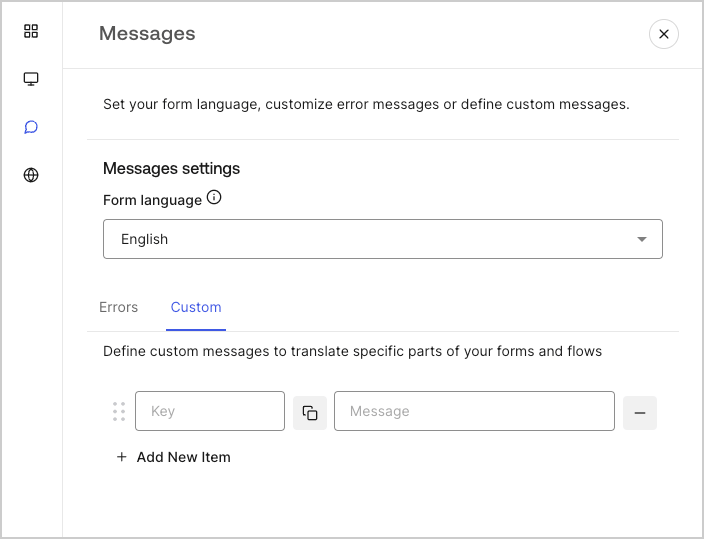
You can create custom messages to add to the default messages for an even further personalized Form experience. For example, you can add a custom message that displays to users when an action returns an error in a flow.

#### Create custom messages

To create custom messages, follow the steps below:

1. From the left menu of the Form editor, select **Messages**.
2. Select the **Custom** tab.Then, select **Add New Item**.
3. To the left, add a unique key for your message\*\*.\*\* Then\*\*, enter\*\* your custom message in the field to the right.
4. Select **Publish** to save.
<Frame>
  <img src="https://mintcdn.com/docs-dev-feat-docs-5521-google-one-tap/PR0hkPqOdvW2qWNQ/docs/images/cdy7uua7fh8z/1upBOwWqntPPQF8fqGeN6T/a65674d05c823c5fbe703265558693e4/custom-message.png?fit=max&auto=format&n=PR0hkPqOdvW2qWNQ&q=85&s=218d7d76d57384b3771a64062f70c4f6" alt="Dashboard > Forms > Custom messages and translations > Custom message" data-og-width="704" width="704" data-og-height="539" height="539" data-path="docs/images/cdy7uua7fh8z/1upBOwWqntPPQF8fqGeN6T/a65674d05c823c5fbe703265558693e4/custom-message.png" data-optimize="true" data-opv="3" srcset="https://mintcdn.com/docs-dev-feat-docs-5521-google-one-tap/PR0hkPqOdvW2qWNQ/docs/images/cdy7uua7fh8z/1upBOwWqntPPQF8fqGeN6T/a65674d05c823c5fbe703265558693e4/custom-message.png?w=280&fit=max&auto=format&n=PR0hkPqOdvW2qWNQ&q=85&s=f61f19389ac024dd578f5bef32bc1397 280w, https://mintcdn.com/docs-dev-feat-docs-5521-google-one-tap/PR0hkPqOdvW2qWNQ/docs/images/cdy7uua7fh8z/1upBOwWqntPPQF8fqGeN6T/a65674d05c823c5fbe703265558693e4/custom-message.png?w=560&fit=max&auto=format&n=PR0hkPqOdvW2qWNQ&q=85&s=9251376e3dcdb30c88fcaba7389da464 560w, https://mintcdn.com/docs-dev-feat-docs-5521-google-one-tap/PR0hkPqOdvW2qWNQ/docs/images/cdy7uua7fh8z/1upBOwWqntPPQF8fqGeN6T/a65674d05c823c5fbe703265558693e4/custom-message.png?w=840&fit=max&auto=format&n=PR0hkPqOdvW2qWNQ&q=85&s=acf46078ed521dea71c9d38714e87ec6 840w, https://mintcdn.com/docs-dev-feat-docs-5521-google-one-tap/PR0hkPqOdvW2qWNQ/docs/images/cdy7uua7fh8z/1upBOwWqntPPQF8fqGeN6T/a65674d05c823c5fbe703265558693e4/custom-message.png?w=1100&fit=max&auto=format&n=PR0hkPqOdvW2qWNQ&q=85&s=b0f7569ddbb5de7eac2cb57a6b72dbd4 1100w, https://mintcdn.com/docs-dev-feat-docs-5521-google-one-tap/PR0hkPqOdvW2qWNQ/docs/images/cdy7uua7fh8z/1upBOwWqntPPQF8fqGeN6T/a65674d05c823c5fbe703265558693e4/custom-message.png?w=1650&fit=max&auto=format&n=PR0hkPqOdvW2qWNQ&q=85&s=ef95ef06367c4ddbbe4e9d9f9d2ce252 1650w, https://mintcdn.com/docs-dev-feat-docs-5521-google-one-tap/PR0hkPqOdvW2qWNQ/docs/images/cdy7uua7fh8z/1upBOwWqntPPQF8fqGeN6T/a65674d05c823c5fbe703265558693e4/custom-message.png?w=2500&fit=max&auto=format&n=PR0hkPqOdvW2qWNQ&q=85&s=ff8864599eb5727d13813e066aceeb2c 2500w" />
</Frame>

#### Add custom messages to your forms

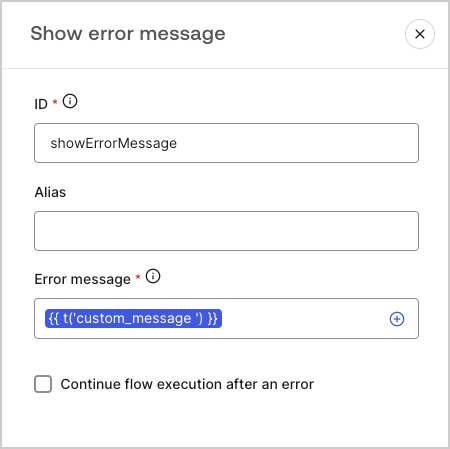
To reference your custom messages in your forms, use the function `{{t('custom_unique_key')}}` with the custom message unique key.
<Frame>
  <img src="https://mintcdn.com/docs-dev-feat-docs-5521-google-one-tap/25dD_9kBYOyIyvY8/docs/images/cdy7uua7fh8z/45p4V7w5gw7DQZyJ08ECSH/d040720d9aa19f6e97e21defcd428e55/translation-function.png?fit=max&auto=format&n=25dD_9kBYOyIyvY8&q=85&s=012fdff815e36076f99a612f72f0920c" alt="Dashboard > Forms > Custom messages and translations > Translation function" data-og-width="450" width="450" data-og-height="449" height="449" data-path="docs/images/cdy7uua7fh8z/45p4V7w5gw7DQZyJ08ECSH/d040720d9aa19f6e97e21defcd428e55/translation-function.png" data-optimize="true" data-opv="3" srcset="https://mintcdn.com/docs-dev-feat-docs-5521-google-one-tap/25dD_9kBYOyIyvY8/docs/images/cdy7uua7fh8z/45p4V7w5gw7DQZyJ08ECSH/d040720d9aa19f6e97e21defcd428e55/translation-function.png?w=280&fit=max&auto=format&n=25dD_9kBYOyIyvY8&q=85&s=e3f99155808f390bf65b8479aab77bcb 280w, https://mintcdn.com/docs-dev-feat-docs-5521-google-one-tap/25dD_9kBYOyIyvY8/docs/images/cdy7uua7fh8z/45p4V7w5gw7DQZyJ08ECSH/d040720d9aa19f6e97e21defcd428e55/translation-function.png?w=560&fit=max&auto=format&n=25dD_9kBYOyIyvY8&q=85&s=bb90cd88992e0780e11e3169fe718285 560w, https://mintcdn.com/docs-dev-feat-docs-5521-google-one-tap/25dD_9kBYOyIyvY8/docs/images/cdy7uua7fh8z/45p4V7w5gw7DQZyJ08ECSH/d040720d9aa19f6e97e21defcd428e55/translation-function.png?w=840&fit=max&auto=format&n=25dD_9kBYOyIyvY8&q=85&s=c450b4fdbbf8dcade940d3873970a87c 840w, https://mintcdn.com/docs-dev-feat-docs-5521-google-one-tap/25dD_9kBYOyIyvY8/docs/images/cdy7uua7fh8z/45p4V7w5gw7DQZyJ08ECSH/d040720d9aa19f6e97e21defcd428e55/translation-function.png?w=1100&fit=max&auto=format&n=25dD_9kBYOyIyvY8&q=85&s=87955e5a21408d6039652c24937f86fd 1100w, https://mintcdn.com/docs-dev-feat-docs-5521-google-one-tap/25dD_9kBYOyIyvY8/docs/images/cdy7uua7fh8z/45p4V7w5gw7DQZyJ08ECSH/d040720d9aa19f6e97e21defcd428e55/translation-function.png?w=1650&fit=max&auto=format&n=25dD_9kBYOyIyvY8&q=85&s=7219cdd4009fb8a3b5324a15d2aee768 1650w, https://mintcdn.com/docs-dev-feat-docs-5521-google-one-tap/25dD_9kBYOyIyvY8/docs/images/cdy7uua7fh8z/45p4V7w5gw7DQZyJ08ECSH/d040720d9aa19f6e97e21defcd428e55/translation-function.png?w=2500&fit=max&auto=format&n=25dD_9kBYOyIyvY8&q=85&s=266351bd60fb4def6ff04829eec2f16a 2500w" />
</Frame>

## Translations

You can use the Translations feature to create an international user experience of your forms. This feature leverages a user’s browser language to determine the appropriate language for your forms.
By default, translations for some standard error messages are provided in Spanish. However, to promote a quality user experience, you can define the translations for your form components, errors, and custom messages in the language of your choice.

To enable translations, follow the steps below:

1. On the Auth0 Dashboard, navigate to **Actions > Forms**.
2. Select **Translations** from the left menu of the Form editor.
3. Check **Enable additional languages**.
4. Select the desired languages from the **Additional languages** dropdown menu.

### Translate messages

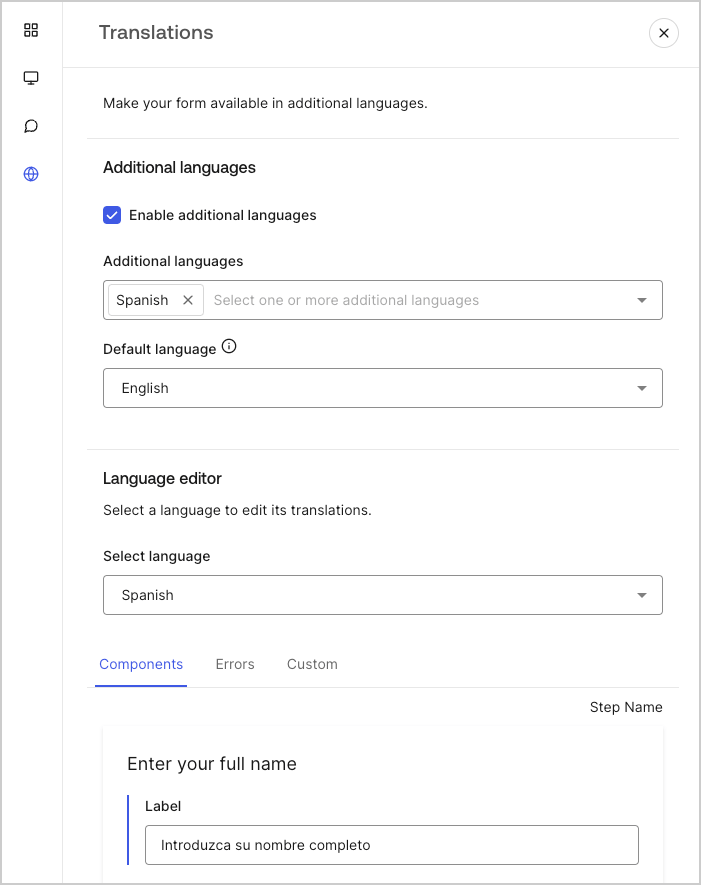
With the language editor, you can define translations for your form components, errors, and other custom messages.

To define your translations, follow the steps below:

1. Select the desired language from theSelect language dropdown menu.
2. Select one of the following tabs to begin defining your translations:

   1. **Components**
   2. **Errors**
   3. **Custom**
3. For each available field, provide your translations as needed.
4. Select **Publish** to save.
<Frame>
  <img src="https://mintcdn.com/docs-dev-feat-docs-5521-google-one-tap/13GCwqPwgonTxyHP/docs/images/cdy7uua7fh8z/5HY9FA6HZct2XNv5K4pCHY/c5977a7825e15285c3d77c2ca1e299a8/translation-message.png?fit=max&auto=format&n=13GCwqPwgonTxyHP&q=85&s=ab40b751f7d2702cd550dae1b7635c75" alt="Dashboard > Forms > Custom messages and translations > Translation message" data-og-width="701" width="701" data-og-height="885" height="885" data-path="docs/images/cdy7uua7fh8z/5HY9FA6HZct2XNv5K4pCHY/c5977a7825e15285c3d77c2ca1e299a8/translation-message.png" data-optimize="true" data-opv="3" srcset="https://mintcdn.com/docs-dev-feat-docs-5521-google-one-tap/13GCwqPwgonTxyHP/docs/images/cdy7uua7fh8z/5HY9FA6HZct2XNv5K4pCHY/c5977a7825e15285c3d77c2ca1e299a8/translation-message.png?w=280&fit=max&auto=format&n=13GCwqPwgonTxyHP&q=85&s=2964b7ebe1fd36b4b2877c5f5e6df95a 280w, https://mintcdn.com/docs-dev-feat-docs-5521-google-one-tap/13GCwqPwgonTxyHP/docs/images/cdy7uua7fh8z/5HY9FA6HZct2XNv5K4pCHY/c5977a7825e15285c3d77c2ca1e299a8/translation-message.png?w=560&fit=max&auto=format&n=13GCwqPwgonTxyHP&q=85&s=c0444533cf6d0f4c8f0e0ed7c0cd0b09 560w, https://mintcdn.com/docs-dev-feat-docs-5521-google-one-tap/13GCwqPwgonTxyHP/docs/images/cdy7uua7fh8z/5HY9FA6HZct2XNv5K4pCHY/c5977a7825e15285c3d77c2ca1e299a8/translation-message.png?w=840&fit=max&auto=format&n=13GCwqPwgonTxyHP&q=85&s=b55b6598aa080151cccc4356594fc926 840w, https://mintcdn.com/docs-dev-feat-docs-5521-google-one-tap/13GCwqPwgonTxyHP/docs/images/cdy7uua7fh8z/5HY9FA6HZct2XNv5K4pCHY/c5977a7825e15285c3d77c2ca1e299a8/translation-message.png?w=1100&fit=max&auto=format&n=13GCwqPwgonTxyHP&q=85&s=56fbb90856109c5570cf154d1342a4ae 1100w, https://mintcdn.com/docs-dev-feat-docs-5521-google-one-tap/13GCwqPwgonTxyHP/docs/images/cdy7uua7fh8z/5HY9FA6HZct2XNv5K4pCHY/c5977a7825e15285c3d77c2ca1e299a8/translation-message.png?w=1650&fit=max&auto=format&n=13GCwqPwgonTxyHP&q=85&s=31e3a529245c947686475ad90bcb0907 1650w, https://mintcdn.com/docs-dev-feat-docs-5521-google-one-tap/13GCwqPwgonTxyHP/docs/images/cdy7uua7fh8z/5HY9FA6HZct2XNv5K4pCHY/c5977a7825e15285c3d77c2ca1e299a8/translation-message.png?w=2500&fit=max&auto=format&n=13GCwqPwgonTxyHP&q=85&s=78db57f4d817e86905cf0210b720926e 2500w" />
</Frame>
